


Most beginners think software testing is just “checking if things work.” That’s only a small part of it.
Software testing basics help you understand how software is checked before real users ever touch it. Good testing prevents crashes, protects user data, and keeps businesses from losing money.
If you are new to testing or planning to start a QA career, this guide will walk you through:
- What software testing really means
- Why it matters in real projects
- How testing is done step by step
- The tools beginners should know
- The basic roadmap to move forward
Each section builds on the previous one so you can understand testing clearly without confusion. If you want to see how QA fits into the bigger picture, explore our complete software engineering roadmap to understand the full career journey.
What Are Software Testing Basics?
Software testing basics mean learning how to check software to make sure it works correctly and meets requirements.
Testing looks for:
- Bugs
- Errors
- Missing features
- Performance issues
A bug is any part of the software that does not behave as expected.
Good testing protects users and saves time and money. Fixing a bug during development is much cheaper than fixing it after release.
Software testing basics are part of Quality Assurance (QA). Quality assurance focuses on improving the whole process, while testing focuses on checking the product itself. We will explain this difference clearly in the next section.
In simple words, testers act like detectives. They try to find problems before customers do.
Why Software Testing Basics Matter
Now that you know what testing is, let’s understand why it is important.
Software testing basics matter because they:
- Find errors before customers see them
- Make software safer and easier to use
- Reduce long-term costs
- Improve product reliability
- Build trust with users
Imagine a banking app that transfers money incorrectly. Or an e-commerce site that crashes during checkout. These are not small problems.
Testing reduces these risks by checking software carefully before release. Strong testing practices are part of the core technical and analytical skills developers need in modern software teams.
As you move forward in this guide, you will see how different types of testing help prevent these real-world failures.
Difference Between Testing and Quality Assurance
Many beginners confuse testing with quality assurance.
They are related but not the same.
| Term | Meaning | Goal |
|---|---|---|
| Quality Assurance | Checks and improves the whole process | Prevent problems |
| Software Testing | Checks the product itself | Find bugs |
| Quality Control | Reviews final product quality | Fix errors |
Quality assurance improves the system that builds software.
Software testing checks the software that system produces.
Understanding this distinction becomes clearer when you study a real-world developer career progression from beginner to advanced roles, which connects directly to SDLC and STLC explained later.
Types of Software Testing Basics
Testing is not one single activity. There are different types of testing, and each one finds a specific kind of problem.
Let’s start with the two main approaches.
1. Manual Testing
Manual testing is often a practical way to start a tech career without degree.
In manual testing, a tester checks the software by hand.
They:
- Click buttons
- Fill forms
- Navigate pages
- Compare expected vs actual results
Manual testing is useful when:
- You need human judgment
- The user experience must be evaluated
- Requirements change often
- Quick feedback is needed
For beginners, manual testing is usually the first step in a QA career. It builds strong foundations before moving to automation.
Later in this guide, we will also see how manual testing connects with regression and smoke testing.
2. Automated Testing
Automated testing uses tools and scripts to run tests automatically.
Instead of repeating the same steps manually, testers write scripts that check the software again and again.
Automation is useful for:
- Regression testing
- Performance testing
- Load testing
- Large projects with repeated checks
Automation requires basic programming knowledge, but it saves time when tests need to run frequently. Automation skills often depend on programming knowledge, which relates to choosing between bootcamp, degree, or self-learning paths.
Most QA professionals start with manual testing and then move toward automation as they grow.
Functional vs Non-Functional Testing
Now that you understand manual and automated approaches, let’s explore testing categories.
Functional Testing
Functional testing checks whether a feature works as expected.
For example:
- Does the login button open the dashboard?
- Does the form submit correctly?
- Does the search bar return results?
Functional testing verifies what the software does.
Non-Functional Testing
Non-functional testing checks how well the software works.
It focuses on:
- Performance (speed)
- Security (protection from threats)
- Usability (ease of use)
- Compatibility (works on different browsers/devices)
Both functional and non-functional testing are necessary for complete quality coverage. You can explore more structured learning materials inside our software engineering learning resources section.
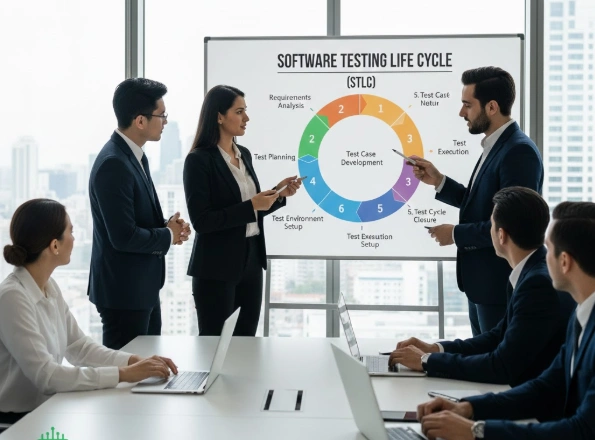
Software Testing Life Cycle (STLC)
Once you understand the types of testing, the next important concept is the Software Testing Life Cycle.
STLC defines the structured process testers follow.
STLC Steps
- Requirement Analysis
Understand what needs to be tested. - Test Planning
Decide strategy, tools, resources, and timeline. - Test Case Design
Write detailed test cases with expected results. - Test Environment Setup
Prepare the testing system. - Test Execution
Run test cases and record results. - Defect Reporting
Log bugs with clear steps and screenshots. - Test Closure
Review results and prepare reports.
Following STLC ensures testing is organized, not random.
SDLC vs STLC
Understanding SDLC helps you see where testing fits in the overall process.
| Life Cycle | Focus | When It Happens |
|---|---|---|
| SDLC | Entire software development | From planning to release |
| STLC | Only testing activities | After development phases begin |
SDLC builds the product.
STLC verifies its quality.
Basic Tools in Software Testing
Understanding testing becomes easier when you analyze practical engineering software examples used in real projects.
Test Management Tools
| Tool | Purpose |
|---|---|
| Jira | Track bugs and manage tasks |
| TestRail | Organize test cases |
| Zephyr | Manage testing within Jira |
Automation Tools
| Tool | Best For |
|---|---|
| Selenium | Web automation |
| Cypress | Fast web testing |
| Playwright | Cross-browser automation |
API Testing Tools
| Tool | Purpose |
|---|---|
| Postman | Send API requests |
| RestAssured | Code-based API testing |
Performance Testing Tools
| Tool | Best For |
|---|---|
| JMeter | Load testing |
| LoadRunner | Enterprise performance testing |
Learning one tool deeply is better than learning many tools superficially.
Sample Manual Test Case (Practical Example)
Most beginner articles miss this part. Let’s look at a simple example.
Feature: Login Page
Test Case:
- Open login page
- Enter valid email
- Enter valid password
- Click login
Expected Result: User should be redirected to dashboard.
Actual Result: If login fails, a bug is logged.
This is how real testing works in projects.
Regression and Smoke Testing
As discussed earlier in automation and manual testing, these two are common in fast-moving teams.
Smoke Testing
Quickly check main features after a build.
If login fails, deeper testing stops.
Regression Testing
Re-run old test cases after new updates to ensure nothing breaks.
Regression testing is essential in agile and continuous delivery environments.
Many regression failures are discovered during common software issue resolution scenarios in production systems.
Important Testing Metrics
Metrics help measure testing effectiveness.
| Metric | Meaning |
|---|---|
| Test Coverage | How much of the system is tested |
| Defect Density | Bugs per module size |
| Escaped Defects | Bugs found after release |
| Test Execution Rate | Tests completed in time |
Tracking these metrics improves long-term quality.
Testing Roles and Career Path
If you are reading this as a beginner planning a QA career, here is a simple growth path:
- Manual Tester
- Test Analyst
- Automation Tester
- SDET
- QA Lead
Most professionals begin with manual testing, understand STLC deeply, then move toward automation and scripting.
Future of Software Testing
Software testing continues to evolve.
- AI-assisted testing tools are emerging
- Automation is expanding beyond UI
- API and security testing are becoming essential
- Continuous testing is growing in DevOps environments
Understanding the basics prepares you for these advanced areas.
FAQs
What are the different types of software testing?
Unit Testing: Tests individual components or functions.
Integration Testing: Ensures modules work together.
System Testing: Validates the complete system against requirements.
Acceptance Testing: Confirms the software meets user needs.
Regression Testing: Checks that new changes don’t break existing functionality.
What is the difference between manual and automated testing?
Manual Testing: Testers execute test cases without tools.
Automated Testing: Uses software tools to run tests automatically.
Speed: Automated tests are faster; manual is slower.
Accuracy: Automated reduces human errors; manual is prone to mistakes.
Cost: Manual is cheaper initially; automation saves time in long term.
What is the purpose of software testing?
Detect Bugs: Identify errors before release.
Ensure Quality: Confirm software meets functional and non-functional requirements.
Verify Performance: Check speed, reliability, and scalability.
Validate User Needs: Ensure software aligns with expectations.
Prevent Failures: Reduce post-release issues and maintenance costs.
What are functional and non-functional testing?
Functional Testing: Checks software features against requirements (e.g., login, forms).
Non-Functional Testing: Assesses performance, usability, security, and reliability.
Focus: Functional = what the software does; Non-Functional = how well it performs.
Goal: Ensure both correctness and quality for end-users.
What is regression testing and why is it important?
Definition: Tests previously working functionality after code changes.
Purpose: Ensure updates or bug fixes don’t break existing features.
Scope: Can be partial or full system testing.
Benefit: Maintains software stability, reduces post-release defects, and saves time in long-term maintenance.
What are the 7 principles of software testing?
The 7 principles explain how testing works in real projects. They include ideas like testing shows defects, early testing saves money, and exhaustive testing is impossible. These principles guide testers to work smarter, focus on risks, and improve quality step by step.
What are the 7 steps of software testing?
The 7 steps usually follow the Software Testing Life Cycle: requirement analysis, test planning, test case design, environment setup, test execution, defect reporting, and test closure. These steps provide structure so testing stays organized and nothing important is missed.
What are the five software testing methods?
The five common methods are unit testing, integration testing, system testing, acceptance testing, and regression testing. Together, they check individual components, combined modules, full systems, user requirements, and updates to ensure software works correctly before release.
Final Words: Simple Truths About Testing
Software testing basics are not just about finding bugs. They are about protecting users, improving quality, and supporting reliable software delivery.
If you understand:
- Types of testing
- STLC process
- Manual and automation basics
- Testing tools
- Real-world examples
You already have a strong foundation.
From here, the next logical step is practicing test case writing and learning one test management tool deeply.
Good testing builds better software. And better software builds user trust.