

JPRO Software is one of the most trusted tools in the heavy-duty truck world. If you work with diesel trucks, buses, or commercial vehicles, you already know how important it is to have a tool that can read problems fast, show clear data, and help you finish the job without wasting time. This extended guide explains everything about JPRO Software in a simple, friendly way. The goal is to help you know what JPRO is, what it does, why people use it, how much it costs, what laptop it needs, how to download and install it, and how it compares to other tools.
What Is JPRO Software?
JPRO Software is a powerful diagnostic tool made for heavy-duty trucks and diesel vehicles. It is created by Noregon and is widely used in repair shops, truck fleets, and mobile mechanics. JPRO helps you read engine codes, find truck problems, run tests, fix issues faster, and understand what is wrong without guessing. It works with many brands and models, making it one of the most multi-purpose tools in the truck diagnostic world. It is designed for real-life mechanics, not just engineers, so the layout is simple, the buttons are clear, and the system gives you step-by-step details.
Why JPRO Is Popular
There are many reasons why JPRO Software is popular in 2025. It works on different trucks, gives fast results, and supports advanced features. Here are simple reasons why technicians prefer it:
It works on many truck brands.
It reads and clears engine codes quickly.
It shows live data so you can see what’s happening inside the truck.
It runs special tests like DPF regeneration.
It helps you save time and makes repairs easier.
It gives clear reports that you can save, share, and print.
It works with trusted hardware like the DLA+ Adapter — and for more detailed insights, you can also check this Software Meetshaxs update guide to stay updated with the latest software improvements.
JPRO Software Features
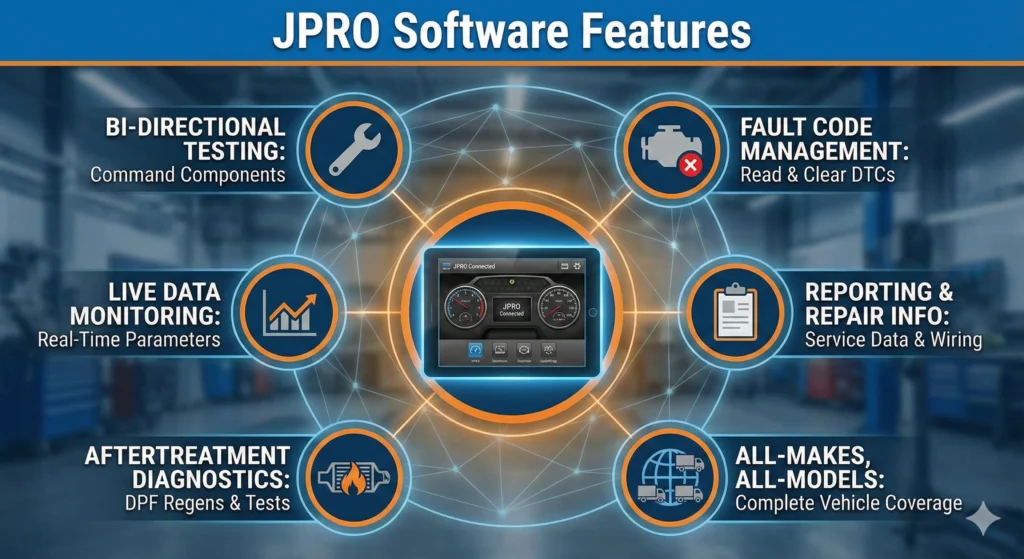
JPRO is full of powerful features that make mechanic work easier. Below is a longer breakdown written in simple English:
All-Makes Support
This means JPRO can connect to many different trucks. You don’t need a separate tool for each brand. One tool works for all major ones.
Live Data Monitoring
JPRO shows information like:
- Engine temperature
- Fuel pressure
- Turbo pressure
- RPM
- Sensor values
You can watch these numbers change live, which helps find the problem faster.
Bi-Directional Controls
This is one of the most important features. Bi-directional means JPRO can speak back to the truck, not just read data. It can control and test parts of the truck. For example:
- Start a DPF Regen
- Turn on fans
- Test actuators
- Run component tests
This helps you check if something is working or not — and for more truck diagnostic tools and software resources, you can visit the TechSpark Info blog.
Fault Code Library
The tool does not only show codes; it also explains them in simple words. JPRO has a huge library of DTC meanings. This helps even new technicians understand what is wrong.
Reporting Tools
JPRO can create detailed reports that include:
- Fault codes
- Live data snapshots
- Repair suggestions
- Vehicle health summary
These reports can be used by the shop, customer, or fleet manager.
Diagnostic Capabilities
JPRO Software can diagnose hundreds of systems. Below is a simple matrix to understand its capabilities.
Diagnostics Table
| Diagnostic Feature | What It Means | Available in JPRO |
|---|---|---|
| Read Engine Codes | Find problem codes | Yes |
| Clear Codes | Remove after repair | Yes |
| DPF Regeneration | Clean diesel filter | Yes |
| Bi-Directional Tests | Activate truck parts | Yes |
| ABS Tests | Anti-lock braking system | Yes |
| Transmission Data | Gearbox info | Yes |
| Logging | Save and replay data | Yes |
This shows that JPRO is full-featured and can handle almost any task needed in truck diagnostics.
Truck, Diesel, and Off-Highway Support
JPRO Software is not just for one kind of vehicle. It works on:
- Heavy-duty trucks
- Medium-duty trucks
- Diesel vehicles
- Buses
- Some off-highway machines
This makes it useful in many different industries, including construction, transportation, and logistics.
Supported Brands
JPRO has broad support for popular brands like:
- Cummins
- Volvo
- Mack
- Detroit
- Ford (Medium-Duty)
- GM (Medium-Duty)
- Allison
- Freightliner
- Peterbilt
- Kenworth
This wide support allows one tool to cover multiple vehicle types in a shop.
Hardware and Laptop Requirements
JPRO needs a good laptop to work smoothly. Below is a simple breakdown.
Minimum Requirements
- Windows 10 or Windows 11
- 4GB RAM
- 20GB free storage
- Intel Core i3 processor
- USB port for adapter
Recommended Requirements
- 8GB or 16GB RAM
- Intel Core i5 or i7 processor
- SSD (Solid State Drive)
- Full HD screen
Best Laptops for JPRO (2025)
For Mobile Technicians
- Rugged laptop like Panasonic Toughbook
- Shockproof, waterproof, dustproof
- Fast SSD
For Shop Technicians
- Business laptop (Dell, Lenovo, HP)
- 16GB RAM
- i5/i7 processor
For Fleet Managers
- High-power desktop
- 32GB RAM
- Large monitor
JPRO Price
The price of JPRO Software in 2025 depends on your needs. The cost changes based on what you buy, the license type, and the bundle.
JPRO Pricing Table
| Package | What You Get | Price Range |
|---|---|---|
| Software Only | JPRO license + updates | $699–$899 |
| DLA+ 2.0 Adapter Kit | Software + adapter + cables | $1,200–$2,000 |
| Full Shop Kit | Software + adapter + training | Custom Price |
Important: Prices can change depending on promotions, shop deals, or reseller offers.
JPRO Download Guide
This is a simple step-by-step download and installation guide.
How to Download JPRO
- Open your computer.
- Go to the official download page (do not use cracked software).
- Log in with your account.
- Download the JPRO Installer.
- Download DLA+ Drivers if you are using the adapter.
- Save both files on your computer.
How to Install JPRO
- Install the adapter driver first.
- Plug in the DLA+ adapter.
- Run the JPRO Installer file.
- Follow the on-screen steps.
- Restart your PC.
- Connect to a truck and start using the tool.
JPRO Diagnostic Service Kit
The JPRO Service Kit usually includes:
- JPRO Software
- DLA+ 2.0 or DLA+ 3.0 adapter
- USB cable
- OBDII cable
- 6-pin and 9-pin connectors
- Carrying case
This kit is perfect for shop technicians who want a full toolset.
JPRO vs Other Diagnostic Software
Here is a comparison to help you understand where JPRO stands.
Comparison Table
| Software | Strength | Weakness |
|---|---|---|
| JPRO | Wide truck support + bi-directional tests | Higher price |
| Autel | Budget-friendly | Not deep for heavy trucks |
| TEXA | Great off-highway support | Can be expensive |
| Cummins INSITE | Best for Cummins | Only for 1 brand |
| OEM Tools | Accurate | Many separate tools needed |
Best JPRO Alternatives (2025)
If JPRO is not right for you, consider:
- Cummins INSITE for only Cummins engines
- TEXA for mixed fleets
- Autel Heavy-Duty for budget users
- OEM tools for dealership-level calibration
Who Should Use JPRO
JPRO Software is best for:
- Truck repair shops
- Mobile mechanics
- Fleet maintenance teams
- Diesel technicians
- Technical training schools
This tool saves time, reduces guesswork, and improves repair accuracy.
Troubleshooting Guide
If JPRO does not connect or read data, use this checklist:
Common Issues and Fixes
- Adapter not detected: reinstall the driver.
- No codes showing: check cables and connectors.
- Slow performance: upgrade RAM or SSD.
- DPF regen not working: check truck conditions (engine temp, fuel level).
- Installation errors: run installer as administrator.
- License issues: confirm your PC date/time is correct.
FAQs
1. What is the JPRO scan tool?
The JPRO scan tool is an advanced truck diagnostic software from Noregon that performs fast, all-makes truck diagnostics, fault detection, and repair guidance. It reads real-time data, supports heavy-duty vehicles, and works as a complete diesel diagnostic software solution for fleets and repair shops.
2. What does JPRO software diagnose?
JPRO software diagnoses engines, ABS, transmissions, after-treatment systems, and electronic controls on Class-4 to Class-8 trucks. It supports diesel diagnosis, off-highway equipment, and multi-brand systems like Detroit, Cummins, Paccar, Volvo, and more.
3. Is JPRO the best heavy-duty truck diagnostic software?
Yes. JPRO is considered one of the best heavy-duty truck diagnostic software options because it offers all-makes coverage, live data, bi-directional controls, and quick troubleshooting. Its Noregon systems platform delivers fast truck computer diagnostics with fewer steps.
4. What do you need to run JPRO diagnostic software?
You need a compatible diagnostic laptop, Noregon adapter, the official JPRO software, and a stable connection to your truck’s ECM. Most shops use a rugged laptop with diesel diagnostic tools, heavy truck software, and off-highway diagnostic tool capability.
5. How much does JPRO software cost?
The JPRO software price varies by package. Most fleets pay for an annual subscription covering updates, JPRO coverage, and technical support. Additional modules like off-highway or heavy-equipment diagnostic software cost more.
6. Is there a free JPRO software download?
No official JPRO software free download is provided by Noregon Systems Inc. Only licensed users can access JPRO diagnostic software, updates, and activation keys. Free downloads online are unsafe and may damage your diagnostic computer for trucks.
7. What vehicles does the JPRO scan tool support?
The JPRO scan tool supports Class-4 to Class-8 trucks, buses, construction equipment, and off-highway machines. It works with major engines, including Cummins, Detroit, Volvo, Paccar, and CAT, making it a leading diesel engine diagnostic software for mixed fleets.
8. What is included in the JPRO diagnostic service kit?
The JPRO diagnostic service kit includes the JPRO laptop, Noregon DLA+ 2.0 adapter, cables, the latest JPRO commercial vehicle diagnostics software, and access to repair data. It’s designed for shops needing a complete heavy-duty diagnostic software solution.
Conclusion
JPRO Software is one of the strongest tools available in 2025 for heavy-duty truck diagnostics. It helps mechanics, fleet managers, and technicians find problems faster, run advanced tests, and understand truck issues clearly. With wide truck support, bi-directional tests, fast data reading, and powerful reporting features, JPRO continues to be a top choice in the industry. By using the right laptop, the correct adapter, and following the simple installation steps, anyone can start using JPRO in just a few minutes. This guide gives you everything you need to know in simple, clear, friendly language.
The live data monitoring feature really sets JPRO apart. In such a fast-paced industry, being able to monitor vehicle health in real time can make all the difference, especially when it comes to preventing breakdowns.